


Built-In Approval Routing
Before a new pay run or employee update goes through, the payroll administrator is notified and can approve or deny the change.CenterPoint Employee Portal
One login for everything payroll touches — time, time off, pay stubs, and personal info — for every employee, anywhere.

Everything Employees Need, One Login
01
One Place for Everything
Time entry, time off, pay stubs, and personal info — all in a single, streamlined website.
02
Clock In From Anywhere
Online Time Clock works from a computer, phone, or shared kiosk — even offline, until you reconnect.
03
Pay Stubs, Self-
Serve
Publish Pay Advices lets employees view pay information online, with no printing or distributing required.
04
Less Back-and-
Forth
Employee-submitted changes route to the payroll administrator for approval — no surprises, no guesswork.
1. The Hub
Employee Portal
One streamlined website that brings together every Red Wing Software payroll web service — time, time off, pay stubs, and personal information — for employees and payroll managers alike.
Self-Serve
Keep Records Up to Date, Automatically
Employees update their own name, address, phone, email, Federal and State Withholding, and direct deposit allocation — right from the portal.
Home Section Announcements
Payroll information, company announcements, or anything else can be posted to the Home section and edited anytime.Quick Links
Point employees to benefit providers, IRS resources, 401K accounts, or company policies — no more forwarding the same email every year.
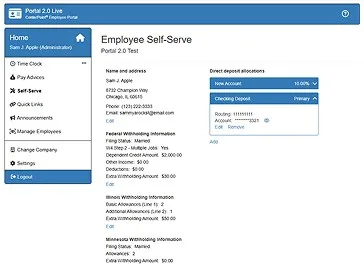
Self-Serve Information
Employees view and update personal info, withholding, and direct deposit allocation in one place.
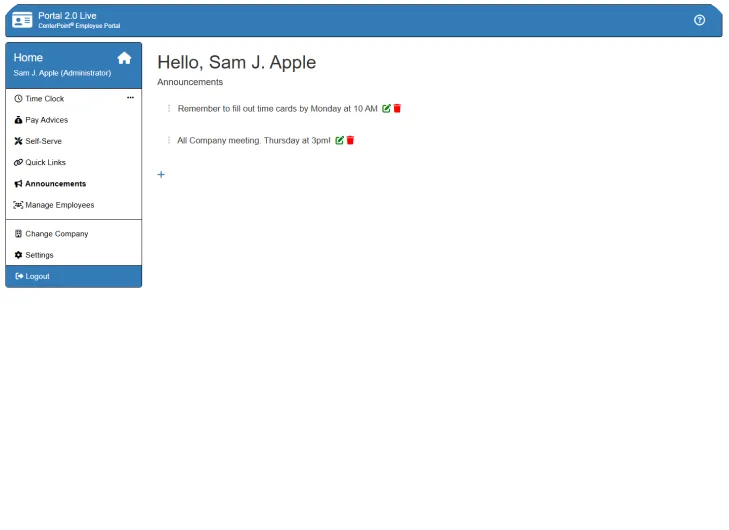
Home & Announcements
Company news and payroll updates, visible the moment employees log in.
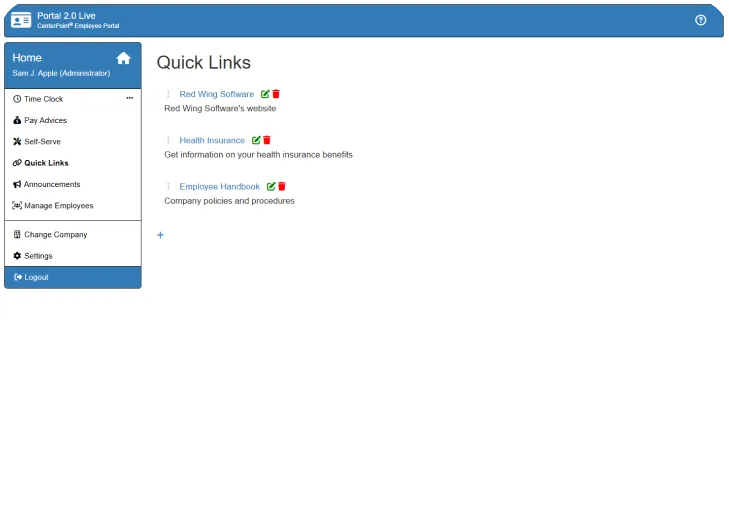
Quick Links
Benefits, policies, and external resources, organized for employees to find on their own.
2. Inside the Portal
Online Time Clock
Enter time online from a computer, tablet, phone, or shared kiosk — with or without an internet connection at the moment of clock-in.
STEP 1
Employees enter their time.
STEP 2
Supervisor approves employee time.
STEP 3
Time entries import into CenterPoint.
STEP 4
Payroll runs from the time sheet data.
Three Ways In
Computer, App, or Shared Kiosk
Employees go to a secure website, install the CenterPoint Time Clock app on a phone, or clock in from a shared kiosk — no per-employee setup required for the kiosk option.
Time-Off Requests, Built In
Employees request time off whether they track hours or not — supervisors get a notification, and employees hear back once it's approved or denied.Flexible Time Tracking
Decimal or hours/minutes, AM/PM or military time, start/stop or total hours worked — set it up to match how your team already thinks about time.Secure by Design
Strictly HTTPS, credential-based login, and email confirmation on account changes. No SSNs or pay rates are ever collected or stored by the time clock.
Flexible Tracking
- Pay Defaults
- Location / Production Center
- Department / Profit Center
- Piece Rate
- Project
How It Works With CenterPoint Payroll
- Works with CenterPoint Payroll in the cloud or installed locally
- Easily import time and convert it to time sheets
- Optional supervisor approval before time is imported
- Imported data is archived and can be reimported if needed
3. Inside the Portal
Publish Pay Advices
Employee access to pay stubs online — pay information from Direct Deposit or paper checks, viewable with a simple, secure login.
STEP 1
Payroll is processed.
STEP 2
Pay stubs generate electronically.
STEP 3
Employees get a notification email.
STEP 4
They log in anytime to view their stub.
No More Paper
Pay Stubs, Published, Not Printed
Eliminate the need to print and distribute paper pay stubs entirely. Once a pay stub is published, employees are notified — current and former employees alike can log in anytime to view it.
Gross Pay, Net Pay, & More
Employees see gross and net pay, vacation time used and remaining, and anything else the employer chooses to include.Less Lookup Work for Supervisors
Supervisors stop fielding "can you send me my pay stub" requests — employees access their own information, any time.Simple, Secure Login
Current and prior employees access pay history through the same straightforward login as the rest of the portal.
Backed by Real People
Unparalleled U.S. -based support
Unlimited Phone & Email Support
Customer Care Membership puts real, with people a call or email away — even at harvest.
Customer-Driven Updates
100% of product enhancements come from customer requests — yours included.
Live & Recorded Training
Full product and single-subject sessions, online or on-site — your choice.
Updates Included
Tax table updates and product enhancements ship automatically with your membership.
See the Employee Portal
on your own team.
Time Clock, Publish Pay Advices, and self-serve information — see how
they work together for your employees.
they work together for your employees.
BOOK DEMO
